
We've already looked at the architecture, project management, data and the User Interface. In this article we'll look at the security and how we will allow the right access to the right users and processes at the right time. The first thing we want to do is add the block for all, so let's start with a wall.
Building a wall the right way
Our first problem is stopping access to anyone who does not have the right access, the easiest way to think of this is to imagine a wall around the app that will stop anyone getting in. Anyone at all. To do this we add a function to run on every, single hit on the system that will deny access. Our wall. This runs on the middleware.js that runs on the server before anything else but does not have full access to everything like a real server.
We set our middleware to run on all pages and block all access returning a 401 page (if you don't know what 401 is, you might want to look at http error codes on something like HTTP Cats).
Now, our wall is around everything, but what about the pages that have no access and must be public like the login page? Or register or the API (we will look at this later in the article). Let's say we only want to check the admin path, so users and processors can login, register, etc. and our API is 'public'. Let's add our fist code to the permissions check and only check the admin:
if (pathname.startsWith('/admin')) {

}
Great, we are allowing access to the pages outside the admin pages, but anyone hitting admin pages are stopped. Now we need to add the access to the wall by adding gates.
Gates
We have a wall that stops all access to admin, we also need to stop access to the API if our API consumer cannot prove they should have access. Lastly, we need to allow access if the system needs to access itself (strange the system cannot access itself, but everything must follow security rules).
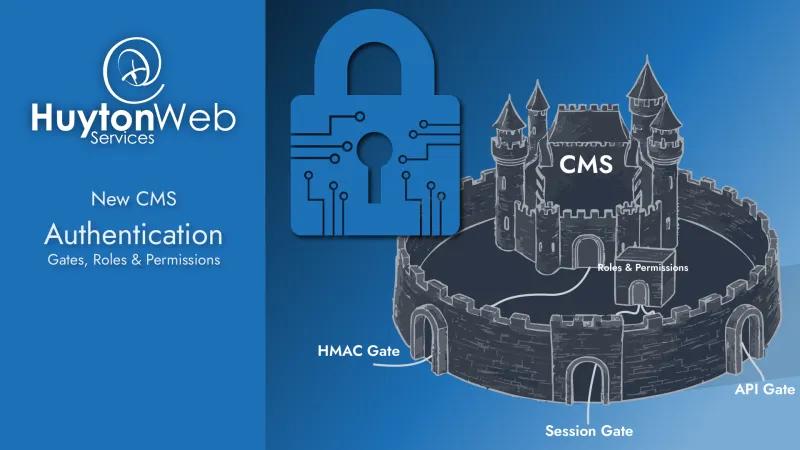
We need to add the ability for some users and processes to access the CMS if they can prove they should be able to. To do this we add some gates and guard them. We'll add 3 gates to our wall:
- HMAC - This will allow the system to access itself
- Session - This will allow a user with any session to access the admin side (we'll tighten this up in a moment)
- API - This will allow a domain to access the API (we'll tighten this up in a moment)
HMAC Gate
This is the simplest gate and needs the least explanation. If the system needs to access secure parts, we need to allow it to. We simply get the 'reader' part of the system to send the 'key' and the part to be read to read the 'lock' at the same time. If the key fits the lock, we allow the request to happen.
This is simple to explain but is difficult in practice. If you want to know more, there is a Wikipedia page here
Session (logged in) Gate
For this we simply allow any request with a session through the gate. Any at all. If a user is logged in, they pass the gate.
Wait a moment!
This isn't secure, what about users that can only access parts of the system or only see some things? Some systems will say "If you can login, you have admin access", but not this system. If a user has logged in, they can pass the gate, but they then hit a new 'room' with a new gate and guard called Roles & Permissions. The reason for this will become clear in a moment. Let's look at the API Gate first.
API Gate
We block access to the API in the same way we do admin, but instead of sending to a page with 'Not authorised', we'll send an error that follows the JSON:API spec (we'll look at the API in more depth in another article) that looks like:
{
  "errors": [
    {
      "status": "401",
      "code": "api-auth-token-invalid",
      "title": "Unauthorised",
      "detail": "Invalid or expired JWT provided to API route.",
      "meta": {
        "level": "error",
        "requestId": "1766052996115"
      }
    }
  ]
}
You'll notice the status 401, again following the HTTP codes (see HTTP Cats) and you'll notice the JWT mentioned?
What we are telling the API consumer is they need a 'JSON Web Token' to access this resource. To get one of these, we will build a system where an admin user can add a domain to the system, the system will give back an API key that the admin can give to the owner of the API consumer on that domain.
When an API consumer from a domain that has been added to the system wants to access the system, it sends the key to the API and the system will check the key and domain. If they match, the system sends a token (JWT, JSON Web Token) back to the API consumer. The API consumer then sends this token (JWT) on every request and is allowed access.
At some point, the token will expire (usually 1 hour), so the API consumer will get a status 401 back. They will then try to get another token, then, once they have the new token, they will try to access the resource again. This can all be automated by the API consumer.
All of this allows the User with the correct permission to allow known domains to access the API but can remove domains if needed. When removed, the domain will have 1 hour access after that until the token runs out and they cannot get another token.
We also have a count for every domain and if they access the API too often, they will be stopped and given an error instead of the resource for a small amount of time. This helps prevent 'spamming' the database with requests. Again, this can be added to the API consumer so it can automatically wait.
Now we have the API gate in place, this allows the API consumer access to the whole API if they have access. Once an API consumer is passed the API Gate they land in a new 'room' with a new gate and guard called Roles & Permissions, the same as the Session Gate.
Let's look at the Roles & Permissions and how it stops and allows API Consumers and Users with a session.
Roles & Permissions
Some systems say if a user is logged in, they can access everything, but not this CMS. A User can create a set of Roles that can be assigned to any User or Domain. A Role can then be assigned permissions. This is known as RBAC.
Once our User has logged in or our API consumer has got their token, they hit the Roles & Permissions check.
On the admin side of the system, we allow an admin user to create any Role they need e.g. 'Content Editor', 'User Manager', etc. We have 2 Roles system roles, 'Admin' and 'User' that are created at setup. The Admin role is a little different to all other roles in that it is allowed to do everything and see everything, no permission checks needed. The User role is given to any user that registers (we'll look at login and registration later), so we can add permissions to the User role to allow and User registered on the system to do certain things e.g. comment.
Once Roles have been set, an Admin user (with the Admin Role) can add or remove permissions to/from any Role, so the Content Editor Role (from the example above) may have the permissions to Create, Update (with soft delete) or Read any content, but cannot Delete content and they won't have access to Create, Update, Read or Delete Users.
Our Admin user can give the User Manager Role the Permissions to Manage users, but not content.
What if we want a user that can Manage Users and Content, but nothing else? We give them both Content Editor and User Manager Roles. This is because Roles are 'additive' i.e. they add the permissions together; they do not remove permissions.
Back to our 'room' analogy. If our User or API consumer has got through the main gates and are in the Roles & Permissions room, they must have the correct Permission to get to the resource they are looking for.
In the real world this means if a User is logged in and wants to get to the Users page, they must have permission to Read users otherwise they do not have access. In-fact, a User without the permission to Read Users won't even see the link for Users in the admin.
Using this system, a User or API consumer with the right Role & Permissions can set up complex Roles & Permissions for a whole company or can simply do everything they need and not worry about the Roles & Permissions at all, safe in the knowledge the system will block all access to the system by default.
We can even have a second system 'tell' the CMS the Roles & Permissions to setup using the API, so a User with access from 1 system can do everything from that system with no knowledge of the CMS at all.
Now we have all the Gates, and our Roles & Permissions explained, we need to look at how a user will get on the system in the first place.
Login and Registration
When the first user sets up the system they are asked to create a login. They create a user with an email address and password, and this becomes the first Admin user i.e. has the Admin role. There are a few rules in place that:
- A user cannot delete themselves
- A user cannot remove their Admin role if they have it
With these 2 rules, there will always be at least 1 Admin user on the system, even if all other users are removed.
In the settings and on setup we have a tick box to allow Registration, which adds the registration link to the main menu and allows users to register for the system themselves. Once a user is resisted, they are given the role User, but a User with the correct permission can add more roles or remove the User role.
The registration can be turned off so a user cannot register, meaning a user with the correct permission must add any new user themselves. If emails have been setup, Admin can send an email to allow the new user to add a password, or they can manually send the link to allow them to do this.
The login and registration uses Next Auth as it allows users to register using multiple types of registration like Google or Amazon without adding multiple APIs, but to start the CMS will only allow Email address and password to register. Once we are ready, we will add the ability for a user with the correct permission to add registration types if they have enabled registration.
Summary
We have 3 gates in the system for HMAC, Session and API, then we have Roles & Permission for the Session and API gates letting only users 'see' what they should see and access what they need to access.
The code for this is extremely complex and is completely bespoke (we've used Next Auth for the login and registration only) and written from scratch but allows for the authentication setup in multiple ways, from 1 person to multiple companies and API consumers and allows for scaling in any direction. There will always be architecture that is missing for edge cases, but once the CMS is 'complete' in the MVP (Minimal Viable Product) sense, we can add more to the Authentication.
We have used Next.js for this system to make sure it is secure and performant for both server and client side which adds multiple levels to this complex architecture, for example, how will the system log an error from the client side to the database, if the user isn't even logged in? I'll leave that to you to figure out.
Next time we'll be looking at the API, but if you have any questions or want to add anything leave a comment or contact us.